A/R Automation Is Not About Replacing Your ERP—It’s About Closing the Gaps Around It
Most businesses already have an ERP or accounting system in place. Invoices are generated, customer balances are maintained, and payments eventually make their way into the system.
The Problem
The Invoice-to-Cash Gap
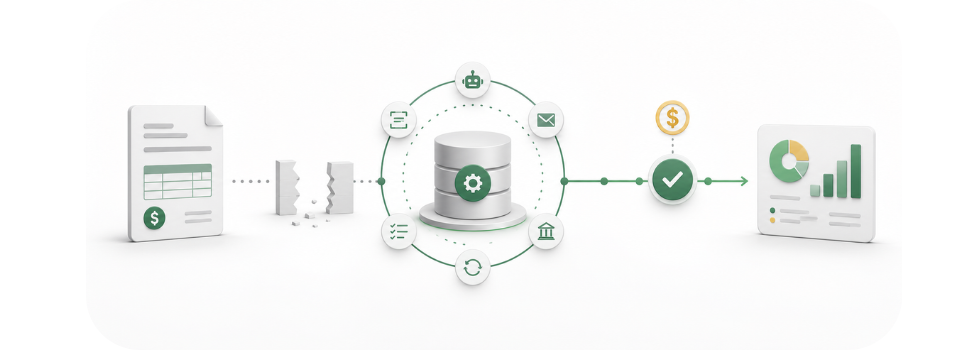
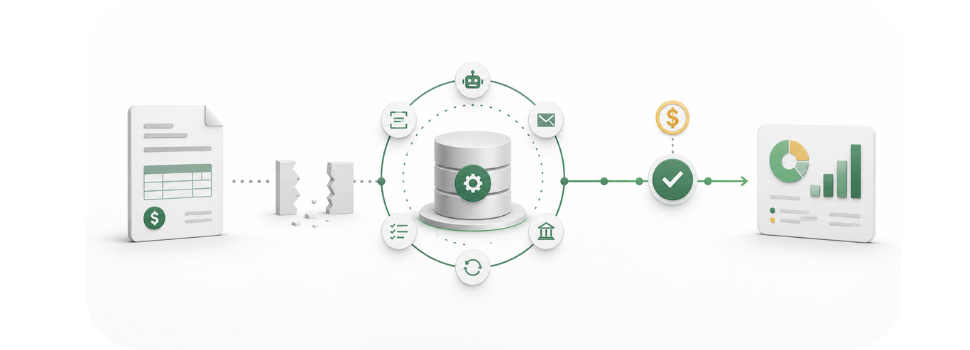
Invoices may be delivered through one system. Payment reminders are managed through email. Customers submit payments through several channels. Remittance information arrives separately, leaving accounting teams to match everything before updating the ERP. That is where the real work—and much of the delay—begins.
A/R automation is not about replacing the systems a business already relies on. It is about connecting the steps surrounding those systems so invoices move from delivery to payment and cash application with fewer manual handoffs.
Accounts receivable is often described as a single process, but it is really a series of connected activities:
- Delivering invoices
- Communicating with customers
- Accepting payments
- Collecting remittance information
- Matching payments to open invoices
- Managing exceptions
- Posting activity to the ERP
- Reporting on balances and collection performance
When these activities are handled in separate systems, the accounting team serves as the point of contact—downloading files, updating spreadsheets, searching through emails, and keying information into the ERP by hand. Even when every individual system performs its assigned function, the overall process remains disconnected.
Beyond Reminders
Automation Should Do More Than Send Reminders
A/R automation is sometimes viewed as little more than scheduled collection emails. Automated reminders can help, but they address only one part of the process. A complete solution should connect the broader invoice-to-cash lifecycle—delivering invoices electronically, giving customers an easier way to view and pay them, collecting structured remittance information, matching payments to the correct accounts, and updating financial records with less manual intervention.
The real objective
Not simply to automate more tasks, but to reduce the number of places where invoices, payments, and information can become delayed, disconnected, or misunderstood.
Customer Experience
Start by Making It Easier to Pay
Customers are more likely to pay promptly when the process is clear and convenient. They should not have to search through old emails, call the accounting department to check a balance, or provide sensitive payment information over the phone.
Digital invoices, self-service portals, and secure payment links allow customers to access their account information and submit payments through a controlled process—by ACH or credit and debit card, using a link sent by email or text.
This does more than improve convenience. It can also:
- Reduce manual payment collection
- Limit employee contact with sensitive payment data
- Capture cleaner information for reconciliation and cash application
Where It Gets Real
Cash Application Is Where Automation Becomes Real
Receiving a payment is not the end of the process. The payment still needs to be identified, matched to the appropriate invoice or invoices, and posted accurately. When remittance information is incomplete or arrives separately, cash application can become one of the most time-consuming areas of A/R.
This is particularly difficult when:
- One payment covers multiple invoices
- Customers take deductions or short-pay an invoice
- Remittance details arrive through email or a customer portal
- Payments are submitted without a clear invoice reference
- Several payment channels feed into the same accounting process
Automation can evaluate payment and remittance data, identify likely matches, and post transactions that meet established criteria. Items that cannot be confidently matched are routed for review—the goal is not to remove people from the process, but to let the system handle routine activity so employees can focus on the exceptions that require judgment.
The Real Measure
Exception Management Is the Real Measure of Success
No A/R environment is completely predictable. Customers combine invoices, use incorrect references, dispute charges, take unauthorized deductions, or submit payments that do not match the expected amount. A solution should not hide those exceptions or force a match simply to increase an automation rate—it should make exceptions easier to identify, prioritize, and resolve.
A well-designed workflow gives the A/R team a clear view of:
- What was matched automatically
- What remains unresolved
- Why an item requires attention
- Which customer or invoice is involved
- What communication has already taken place
That creates a better division of labor: automation handles volume, while employees handle judgment.
Internal Alignment
A Shared View Changes the Conversation
Another common problem in A/R is that different departments have different versions of the same customer story. Collections may have notes in one system. Sales may have recent customer communication in another. Customer service may know about a dispute that accounting has not yet seen.
Without a shared view, customers receive duplicate messages, internal teams work from incomplete information, and collection decisions are made without context. Centralizing invoices, payments, notes, emails, calls, disputes, and account activity gives finance, sales, customer service, and management access to the same information. That visibility can improve internal coordination just as much as it improves collections.
A Note on AI
What AI Should—and Should Not—Do in A/R
AI has become part of nearly every conversation about financial technology, but its value should be measured by practical outcomes. In A/R, AI can help surface visibility into aging, open balances, payment status, collection activity, customer payment trends, unresolved exceptions, collector workloads, and expected cash flow.
These capabilities can help teams work more efficiently, but AI should not operate as an unexplained black box. Finance leaders should understand what the system is doing, what rules govern the workflow, how exceptions are handled, and where human approval remains necessary. The best use of AI is not to make every decision for the accounting team—it is to organize information, reduce repetitive work, and help employees make better decisions sooner.
Real-Time Insight
Better Visibility Leads to Better Decisions
Spreadsheets and month-end reports can show what has already happened. A connected A/R platform should help teams understand what is happening now.
Real-time dashboards can provide visibility into:
This allows managers to focus resources where they will have the greatest impact instead of treating every account the same. It also gives finance leaders a more reliable view of receivables throughout the month—not just after the books are closed.
Getting Started
Automation Does Not Have to Begin Everywhere
One reason A/R automation projects stall is that organizations try to address the entire process at once. That is not always necessary. A business can begin with the area creating the greatest operational burden—such as cash application, electronic invoice delivery, payment acceptance, or collections. Once that workflow is established, automation can expand into other areas.
A phased approach allows the organization to evaluate results, confirm integration requirements, adjust internal procedures, and build confidence before expanding. The right starting point depends on where the most significant friction exists today.
Evaluation Checklist
Questions Finance Leaders Should Ask
Before selecting an A/R automation solution, finance teams should look beyond a list of features. The more important questions include:
- Does the solution connect with our existing ERP and banking workflows?
- Can customers view invoices and make payments without contacting our staff?
- How are payments and remittance information matched?
- What happens when the system cannot make a confident match?
- Can we control collection rules and communication schedules?
- Will our teams share a complete view of customer activity?
- How is sensitive payment data secured?
- What reporting will management receive in real time?
- Can we begin with one part of the process and expand later?
- Can the solution be tested using our actual A/R data?
The answers reveal whether the platform will genuinely improve the process or simply add another system for employees to manage.
The Bigger Picture
Moving From Task Management to Receivables Management
A/R automation is not about removing responsibility from the finance team. It is about removing the repetitive work that prevents the team from managing receivables effectively. When invoices, customer communication, payment acceptance, cash application, and reporting operate within a connected workflow, employees spend less time moving information and more time resolving issues, improving customer relationships, and protecting cash flow.
That is the real value of automation: not doing the same work faster, but changing where the team spends its time.
How UTA Helps
How UTA Supports the Invoice-to-Cash Process
United TranzActions helps businesses connect the full invoice-to-cash lifecycle through A/R automation and integrated payment acceptance. UTA's solution supports electronic invoicing, customer self-service, secure digital payments, AI-powered cash application, intelligent collections, centralized account activity, and real-time management reporting.
Paired with UTA's payment processing capabilities, businesses can improve the customer payment experience while strengthening security, supporting compliance, and maintaining greater control over payment costs. Organizations can also begin with a specific area, such as cash application, and expand automation as their needs evolve.
The objective is straightforward: give finance teams a connected process that reduces manual effort, improves visibility, and creates greater certainty throughout the receivables lifecycle. For organizations evaluating A/R automation, the best place to begin is not with the technology—it is with the part of the current workflow that creates the most friction.
Where Could Automation Have the Greatest Impact?
If you would like to explore where automation could have the greatest impact on your A/R operation, we'd welcome the opportunity to review your current process and compare approaches.
Vice President, Business Development
mtapia@unitedtranzactions.com | 800.858.5256 ext. 3028 | Direct: 786.264.7028
www.unitedtranzactions.com
Certainty is our Guarantee!